A Guide to ERP Master Data Migration

Today’s guest blog post is about MDM for SAP.

At the heart of every organization is their Enterprise Resource Planning (ERP) systems, that organizations install to simplify and integrate their business operations like supply chain, finance, human resource, procurement, and marketing into a cohesive system.

The databases stored in the ERP systems come from multiple sources and geographies, also varying upon the type of datasets that organizations need to maintain. The datasets help the departments to draw analytics and project the growth and opportunities that and growth of the company.

A Deloitte report states that “data migration and generative AI are key growth areas, with 80% of global business leaders believing AI will boost business efficiency”. With technological advancements, data migration often becomes a challenge for the organizations, yet it stands out to be an important step that companies need to take up, for efficient ERP implementation, for maintaining the data quality. Hence, the process needs careful planning and execution, to avoid any data inaccuracy and inconsistencies.

Master data is the fundamental business data like customers, products, suppliers, employees, and financial accounts that fuel an organization’s daily operations. Inappropriate data migration can result in data inconsistency, business disruption, and expensive delays. Thus, it’s crucial to plan and implement master data migration meticulously.

In this guide, we will discuss the best practices, strategies, and important considerations to make your master data migration to your new ERP system smooth and successful.

What is ERP Master Data Migration?

ERP Master Data Migration is the activity of migrating important data from old systems (or other data sources) into the new ERP system, when there are any upgradations announced in the ERP software. Gartner reports that75% of ERP strategies are not strongly aligned with overall business strategy, leading to confusion and lackluster results.”

Like SAP ECC migration to SAP S/4 Hana, there are steps that organizations can take to build their SAP master data management [learn more]. It includes extracting, transforming, cleansing, and loading (ETL) the data into the new ERP environment with the assurance that it is accurate, consistent, and in alignment with the business needs.

Why is Master Data Migration Important?

The quality of your data will reflect the success of your ERP implementation. Correct master data guarantees:

  • Operational Efficiency: With dependable and uniform data, business operations such as procurement, sales, inventory, and accounting work harmoniously.
  • Data Consistency: Master data migration ensures the new ERP system works with harmonized and standardized information.
  • Compliance: For industries where they must follow rules, data integrity is paramount to handle audits and compliance with rules.
  • Decision Making: Quality data facilitates proper reporting and quality decision-making.

Major Challenges of ERP Master Data Migration

Prior to discussing the best practices, let us mention the major challenges most organizations encounter while performing the ERP master data migration:

  • Data Quality Issues: Unreliable, stale, or erroneous data in legacy systems.
  • Complicated Data Structures: Legacy systems can have various data formats, which are to be mapped to the new ERP system.
  • Integration across Multiple Systems: Data migration from multiple unrelated systems can be a challenge of integration.
  • Disruption to Business: Incomplete or incorrect data migration can result in operational downtime and business process delay.
A diagram of challenges that companies face while migrating their ERP master data.

ERP Master Data Migration Step-by-Step Guide

Master data migration to a new ERP system is a business-critical process that must be properly planned, executed, and verified to maintain business continuity and data integrity. This detailed guide dissects the critical steps in effective ERP data migration.

1. Planning and Preparation

The key to a successful migration is careful planning. In the absence of a solid plan, the migration process itself can soon turn chaotic and result in problems such as data loss, inconsistencies, or delays. Here’s how you can lay the groundwork for a seamless migration:

  • Scope and Data Requirements: Identify the kind of data that must be migrated customer information, financial data, product information, inventory, vendor information, etc. Determine the source systems where this data is located now and decide if all data must be migrated at one time or in phases.
  • Assess Data Quality: Conduct a thorough review of the existing data to assess its quality. Look for discrepancies, outdated information, duplicate records, and gaps. This is the time to clean up the data before it enters the new system, as poor-quality data can have far-reaching consequences in the ERP system.
  • Set Clear Objectives: Define clear objectives for migration. Whether it is enhancing data accuracy, simplifying processes, or facilitating improved analytics and reporting, your objectives will inform the migration strategy. These objectives will also inform the assessment of the success of the migration process.
  • Create a Budget and Timeline: Set a firm timeline for migration, accounting for testing, data validation, and potential holdups. Be sure that you have sufficient time and budgetary resources to conduct the migration with success.

2. Data Transformation and Mapping

Once you have a complete picture of the data that needs to be migrated, the second step is mapping and reshaping it to the form of the new ERP system. This makes sure that the data from all the different legacy systems fits perfectly with the fields and format in the new ERP system.

  • Data Mapping: Determine how each data element of the old system will be represented in the new system. Customer names and addresses in the old system, for instance, can be broken down into several fields in the new system, such as first name, last name, and address. It’s important to map all data fields meticulously to ensure accuracy.
  • Data Transformation: This is the process of transforming data into a compatible form for the new ERP system. It can entail normalizing values (e.g., product codes to a standardized format) or altering the format of dates and addresses. Data transformation ensures data from different sources integrate well and consistently into the new system.
  • Data Enrichment: Missing data or out-of-date records must sometimes be filled in or updated prior to migration. Data enrichment can involve the addition of missing customer details, the updating of out-of-date financial records, or ensuring data consistency between data sets.

3. Data Cleansing and Validation

Data cleansing is a critical step that provides for the quality of the data to be migrated. Clean data results in more credible reporting and better decision-making.

  • Remove Duplicates: Determine and remove any duplicate records so that the new system will not get duplicate data, which will lead to confusion and inefficiency.
  • Correct Inaccurate Data: Carefully scan data for inaccuracies. This could involve correcting wrong addresses, outdated prices, or incorrect product descriptions. It is important to have accurate data for seamless operations in the new ERP system.
  • Validate Data: Validate the data against business rules and ensure it is of high quality before migration. This could be done by involving major stakeholders or department heads in validation of the accuracy of the data. Validating data ensures that data migrating is accurate and useful.

4. Migration Execution

After data cleansing, transformation, and mapping have been done, the final thing to do is to perform the migration. It entails transferring data from old systems to the new ERP system.

  • Test Migration: Always begin with a test migration in a sandbox or non-production environment. This will enable you to mimic the migration process and see if there are any problems prior to the actual migration. Test the migration with a subset of data so you can ensure data integrity and mapping accuracy.
  • Full Migration: After successfully completing the test migration and having rectified all the issues, go ahead with the full data migration. Depending on the complexity and volume of the data, the migration can occur in stages—moving data for one department at a time to avoid risk and reduce downtime. It is also possible that a phased process can be used to identify and resolve issues early.
  • Data Migration Tools: Leverage the use of specialized migration tools and services to automate the migration process. These tools can streamline data transfers, minimize manual errors, and accelerate the migration process.

5. Post-Migration Testing and Monitoring

Once the data has been successfully migrated, it’s critical to conduct thorough testing to verify that everything functions as anticipated. This stage entails checking the integrity and functionality of the migrated data and ensuring that the new ERP system runs smoothly.

  • System Validation: Verify all aspects of the new ERP system that depend on the data that has been migrated, such as reporting, system integrations, and entry forms. This confirms that the system is doing what it’s supposed to, and that the data is properly reflected throughout the system.
  • User Acceptance Testing (UAT): Involve end-users and stakeholders to verify the usability and accuracy of data in the system. UAT confirms that the new system complies with the business needs and that users are at ease handling the migrated data. It’s critical to obtain key users’ sign-off of the readiness of the system before going live.
  • Monitor for Problems: Post-migration, keep monitoring the system for any performance problems, data inconsistencies, or user complaints. Have a good communication channel with end-users to report and correct any problems in a timely manner. Keep an eye on system performance, integrations, and data streams to make sure that everything works as expected.

6. Training and Support

Training and assistance are vital to familiarize the users with the new ERP system and to settle post-migration issues at the earliest.

  • End-User Training: Perform training classes for all employees involved to acquaint them with the new ERP system and how to handle the migrated data. From basic data input to sophisticated reporting functions, everything needs to be trained on. Hands-on training sessions enable the users to efficiently move around the system and cut down the learning curve.
  • Ongoing Support: Provide post-migration support to resolve issues that occur after the migration. This could involve establishing a help desk, offering FAQs, or providing troubleshooting material. Ongoing support will allow any unforeseen problems to be resolved as soon as possible, maintaining operation smoothness.
  • Documentation: Offer extensive documentation that explains new workflows, data access methods, and system features. Documentation will act as a guide for users and facilitate consistency in data handling within the new ERP system.
A roadmap showing the steps that companies must walk through for a proper migration of their ERP master data.

Best Practices for Successful ERP Master Data Migration

  • Involve Key Stakeholders: Engage key business stakeholders in the migration process. Their feedback will ensure that the data migration is business-oriented and minimizes resistance to change.
  • Use Automated Tools: Utilize data migration software and tools to automate and simplify the migration process. These tools can minimize errors, save time, and provide improved data consistency.
  • Backup Data: Always backup your data prior to starting the migration process. This will give you a rollback strategy in case of failure.
  • Establish a Governance Framework: Set well-defined roles and responsibilities for data management prior to, during, and after the migration.
  • Prioritize Data Quality: Prioritize data quality from the start since bad data will destroy the ERP system’s success. Clean, correct, and standardized data are essential for smooth migration.

Conclusion

Master data migration is an important activity in implementing or replacing an ERP system. By planning your data meticulously, mapping it, cleansing it, and validating it, you can steer clear of typical pitfalls and guarantee that your new ERP system runs smoothly and effectively. Data migration to a new ERP system calls for a systematic approach, the appropriate tools, and cooperation from all stakeholders involved. Through adherence to the best practices established in this guidebook, you can make your ERP master data migration smooth and position your organization for future success.
Environmental Data Management

As examined in the post The Intersection Between MDM, PIM and ESG, environmental data management is becoming an important aspect of the offerings provided in solutions for Master Data Management (MDM) and Product Information Management (PIM). Consequentially, this will also apply to the Data Quality Management (DQM) capabilities that are either offered as part of these solutions or as standalone solutions for data quality.

This site has an interactive Select Your Solution service for potential buyers of MDM / PIM / DQM solutions. The service has a questionnaire and an undelaying model for creating a longlist, shortlist or direct PoC suggestion for the best candidate(s) according to the context, scope, and requirements of an intended solution.

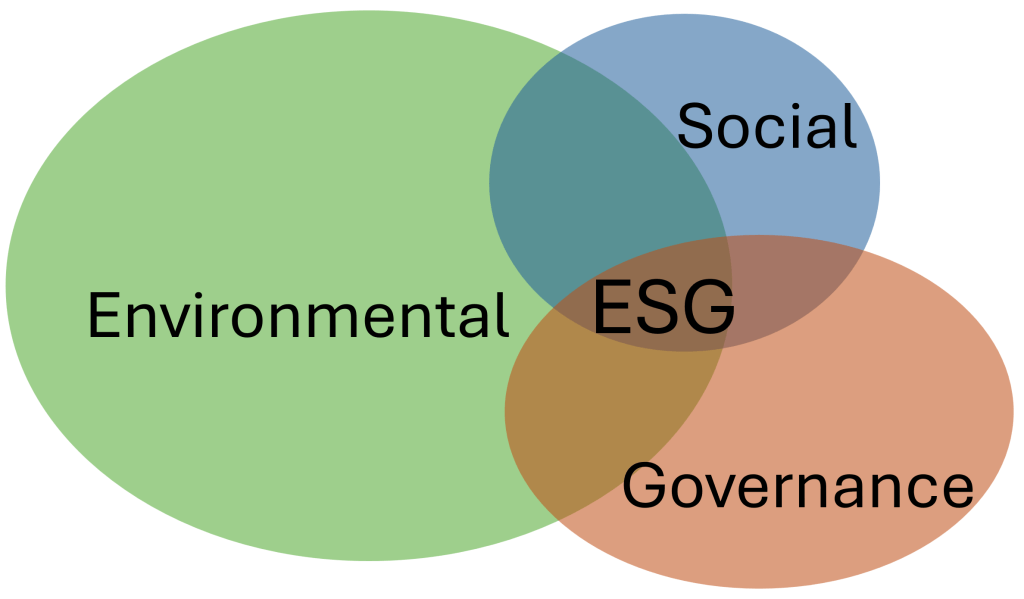
In line with the rise of the Environmental, Social and Governance (ESG) theme, the questionnaire and the underlying selection model must in the first place be enhanced with environmental data management aspects, as the environmental part of ESG is the one with the currently most frequently and comprehensive experienced data management challenges.

There is already established a good basis for this.

However, if you as either one from a solution end user organization with environmental data management challenges or a solution provider have input to environmental data management aspects to be covered, you are more than welcome to make a comment here on the blog or use the below contact form:

Go back

Your message has been sent

Warning
Warning
Warning
Warning.

What You Should Know About Master Data Management

Today’s guest blog post is from Benjamin Cutler of Winpure. In here Benjamin goes through a few things that you in a nutshell should know about master data management.

People

People have multiple phone numbers and multiple email addresses and in 2022 there must be several decades of historic contact information available for any one person. Most of us move at least once, every few years. Sometimes we go by different nicknames in different situations, some people even change their names. We hold different titles throughout the course of our careers and we change companies every few years. Only a few people in our lives know exactly how to get a hold of us, at any given time. Many of us change vehicles just as often as we change our hair color. Many of us are employees, most of us are also customers, many of us are spouses and sometimes we are grandparents, parents, aunts, uncles, and children at the same time. Sometimes we’re out enjoying ourselves and sometimes we just want to be left alone. We each have unique interests and desires, but we also have many things in common with other groups of people.

Products

Products have many different descriptions, they come in many different variations, different sizes, different colors, and different packaging materials. Similar products are often manufactured by different manufacturers, and they can be purchased from many different commercial outlets, at different price points. Any one product on the market at any one time will likely be available in several variations, but that product will also likely change over time as the manufacturer makes improvements. Products can be purchased therefore they can also be sold. They can also be returned or resold to other buyers, so there are different conditions and ways to determine product value. There are SKU and UPC numbers and other official product identification and categorization systems including UNSPSC and others, but none of them speak the same language.

Companies

Companies are made up of many different people who come and go over time. The company may change names or change ownership. It may have multiple locations which means multiple addresses and phone numbers, and they probably offer many different ways to contact them. Depending on where you look, there are probably more than a dozen different ways to find their contact information, but only some of those company listings will be correct. Companies have tax IDs and Employer IDs and DUNS IDs in the US, and there are many different systems worldwide.

Addresses

Addresses are the systems we use to identify locations. Each country and territory has its own system so each system is different. In the US we use premise numbers, street names with and without street prefixes and suffixes, we use unit numbers, states, counties, cities, towns and 5 and 9 digital numerical postal codes. Addresses and address systems can change over time, and they are inherently one of the most inconsistent forms of identification. Addresses are usually riddled with errors, misspellings, different structures and formatting, and they can be very difficult to work with. What makes this even more difficult is that the same address represented in multiple internal business systems will often be represented differently, and will rarely match the way the same address is represented externally.

Data

Data is a digital description of all of these things. Data usually comes in columns and rows and all shapes and sizes. Data about these things is captured, stored in business systems and it’s used to get work done. Need to call a contact? Check your contact data. Need to know a company’s billing address? Check your company data. Need to know something about a product? Check your product information. Need to know something about where your customers live and work or where to deliver the product? Check your address information. But here’s the thing: the information rarely matches from system to system and it’s very hard to keep up to date. This is especially difficult for a few reasons. Internally your company probably has many different business systems and many different ways of storing and representing these things, so it rarely matches internally, plus, the way that your company stores and represents this information will almost never match external information. How can you know the best way to contact your customer who has multiple phone numbers and multiple email addresses? If you’re searching some external system for updated information about some product or contact and the information doesn’t match, how do you find the new information? How can you know if your own information is correct and up to date? How can you scale your efforts to communicate with hundreds or thousands of customers at a time, communicating information that is specifically relevant for each of them? If the information doesn’t match or is not correct, how can you know who is who?

Relationships

The relationships across people, other groups of people, products, other groups of products, companies, other groups of companies, addresses, and other addresses, is where the rubber hits the road. Business value comes from connecting companies and products or services with other people and companies, and other products and services, at scale. Customers purchasing products might be interested in purchasing related products. Customers often buy things based on location. Companies selling to customers might be able to sell more, if they target similar customers in similar locations. Products and services also sell well based on location, and companies can optimize sales territories and delivery routes based on the relative proximity to other locations.

People and Technology

The people and technology between all of this, finds it difficult to keep up. People do things one by one and we’re good with ambiguity. We program computers and business systems to do things faster. Computers do things programmatically and very quickly but they’re not good with ambiguity. People can see similarity between things that are similar, but computers and business systems cannot. People might be good with troubleshooting and critical thinking, but computers and business systems are not. A computer program might be able to find the same customer in multiple systems and might be able to update that customer’s information all at once, but how can you know if the new information is the best information? Knowing that your customer probably has multiple phone numbers and multiple addresses and multiple nicknames, how can you know which information is correct? Doing this at scale can be very, very difficult.

In Conclusion

Master Data Management is very difficult but it’s fundamental in scaling your business. People can sell products door-to-door, but data and technology allow us to market, sell, deliver, and service our products and services, to tens and hundreds of thousands of people in milliseconds, regardless of the distance. Most organizations still view data as a cost of doing business but with the right investments in people, process, technology, and in data management, we can scale as worldwide organizations.

Nine Essential Master Data Processes in The Data Supply Chain

Master Data Management (MDM) and the overlapping Product Information Management (PIM) discipline is the centre of which the end-to-end data supply chain revolves around in enterprises that produce and/or sell goods.

Nine essential master data processes are:

1: Onboard Customer Data

It starts and ends with the King: The Customer. Your organization will probably have several touchpoints where customer data is captured. MDM was born out of the Customer Data Integration (CDI) discipline and a main reason of being for MDM is still to be a place where all customer data is gathered as exemplified in the post Direct Customers vs Indirect Customers.

2: Onboard Vendor Data

Every organization has vendors/suppliers who delivers direct and indirect products as office supplies, Maintenance, Repair and Operation (MRO) parts, raw materials, packing materials, resell products and services as well. As told in a post on this blog, you have to Know Your Supplier.

3: Enrich Party Data

There are good options for not having to collect all data about your customers and vendors yourself, as there are 3rd party sources available for enriching these data preferable as close to capture as possible. This topic was examined in the post Third-Party Data and MDM.

4: Onboard Product Data

While a small portion of product data for a small portion of product groups can be obtained via product data pools, the predominant way is to have product data coming in as second party data from each vendor/supplier. This process is elaborated in the post 4 Supplier Product Data Onboarding Scenarios.

5: Transform Product Data

As your organization probably do not use the same standard, taxonomy, and structure for product data as all your suppliers, you have to transform the data into your standard, taxonomy, and structure. You may do the onboarding and transformation in one go as pondered in the post The Role of Product Data Syndication in Interenterprise MDM.

6: Consolidate Product Data

If your organization produce products or you combine external and internal products and services in other ways you must consolidate the data describing your finished products and services.

7: Enrich Product Data

Besides the hard facts about the products and services you sell you must also apply competitive descriptions of the products and services that makes you stand out from the crowd and ensure that the customer will buy from you when looking for products and services for a given purpose of use.

8: Customize Product Data

Product data will optimally have to be tailored for a given geography, market and/or channel. This includes language and culture considerations and adhering to relevant regulations.

9: Personalize Product Data

Personalization is one step deeper than market and channel customization. Here you at point-of-sale seek to deliver the right Customer Experience (CX) by exercising Product eXperience Management (PXM). Here you combine customer data and product data. This quest was touched in the post What is Contextual MDM?

Digital Twins in the MDM Product Domain / PIM

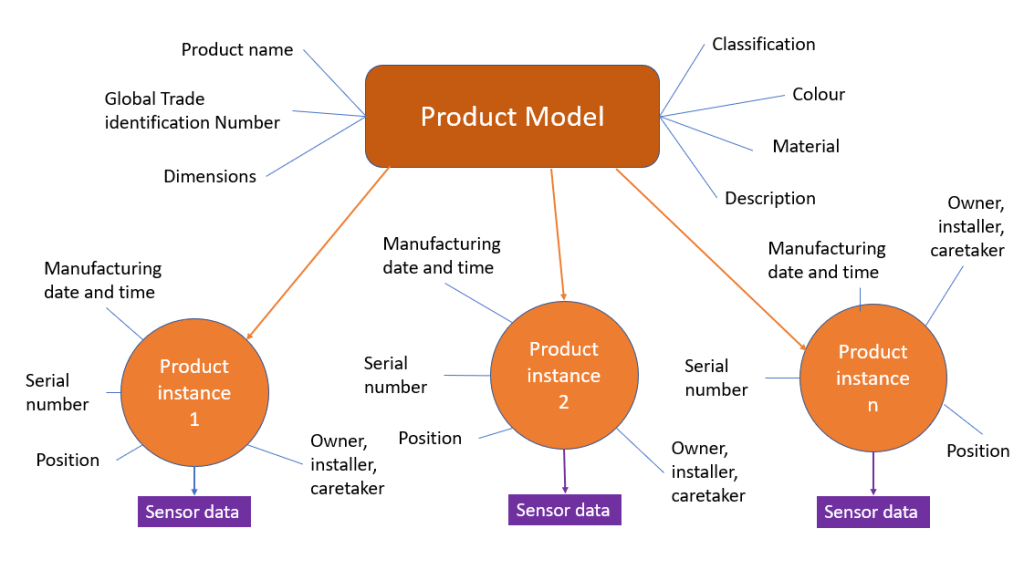
When working with the product domain in Master Data Management (MDM) and with Product Information Management (PIM) we have traditionally been working with the product model meaning that we manage data about how a product that can be produced many times in exactly the same way and resulting in having exactly the same features. In other words, we are creating a digital twin of the product model.

As told in the post Spectre vs James Bond and the Unique Product Identifier the next level in product data management is working with each product instance meaning each produced thing that have a set of data attached that is unique to that thing. Such data can be:

  • Serial number or other identification as for example the Unique Device Identification (UDI) known in healthcare
  • Manufacturing date and time
  • Specific configuration
  • Current and historical position
  • Current and historical owner
  • Current and historical installer, maintainer and other caretaker
  • Produced sensor data if it is a smart device / machine

There is a substantial business potential in being better than your competitor in managing product instances. This boils down to that data is power – if you use the data.

When managing this data, we are building a digital twin of the product instance.

Maintaining that digital twin is a collaborative effort involving the manufacturer, the logistic service provider, the owner, the caretaker, and other roles. For that you need some degree of Interenterprise MDM.